


The ideal investment tracking app makes managing investments a breeze. Investment apps can track not only the portfolio’s performance, but also its fees, asset allocation and projected future growth. What follows are some of the best investment tracking apps based on numerous factors, including cost, features and ease of use.
Note that I have used all of these options for years. I typically use several at one time just to keep up with new features. Empower and Kubera are my two favorites, but that may change as other apps introduce new tools, particularly if they include AI in some interesting way.
Summary of Best Investment Tracking Apps
Best Free Investment Tracker
Empower
Price: Free
Empower is by far the best free investment and portfolio management app. It’s easy to use and provides information on asset allocation, performance, and fees via interactive charts and graphs.
Best for HNWIs
Kubera
Price: 14-day free trial; $249/year
Kubera is the most sophisticated investment tracking tool on the list. It uses multiple industry-standard tools to connect accounts. It can also track the most types of assets, including crypto, domains, vehicles and real estate.

Best for Rebalancing
Snowball Analytics
Price: Free plan available; paid plans from $6.70/mo.
Snowball Analytics is an easy to use portfolio tracking tool. Link to accounts or enter manually, it provides details on asset allocation, performance, and even a rebalancing too.

Best for Research & Community
Seeking Alpha
Price: 7-day free trial; $254/year ($45 off Regular Price)
Seeking Alpha is ideal for those looking for stock research, screeners and community. I track my portfolio in SA and it gives me excellent research and news about my holdings.

Empower
Empower (formerly Personal Capital) is the best option for most people in my opinion. It’s the investment tracking app I’ve used for more than a decade. It’s the most popular for several reaons.
First, once you link your investment accounts to Empower, it automatically downloads all of your transaction and balances. It can link both retirement and non-retirement accounts.
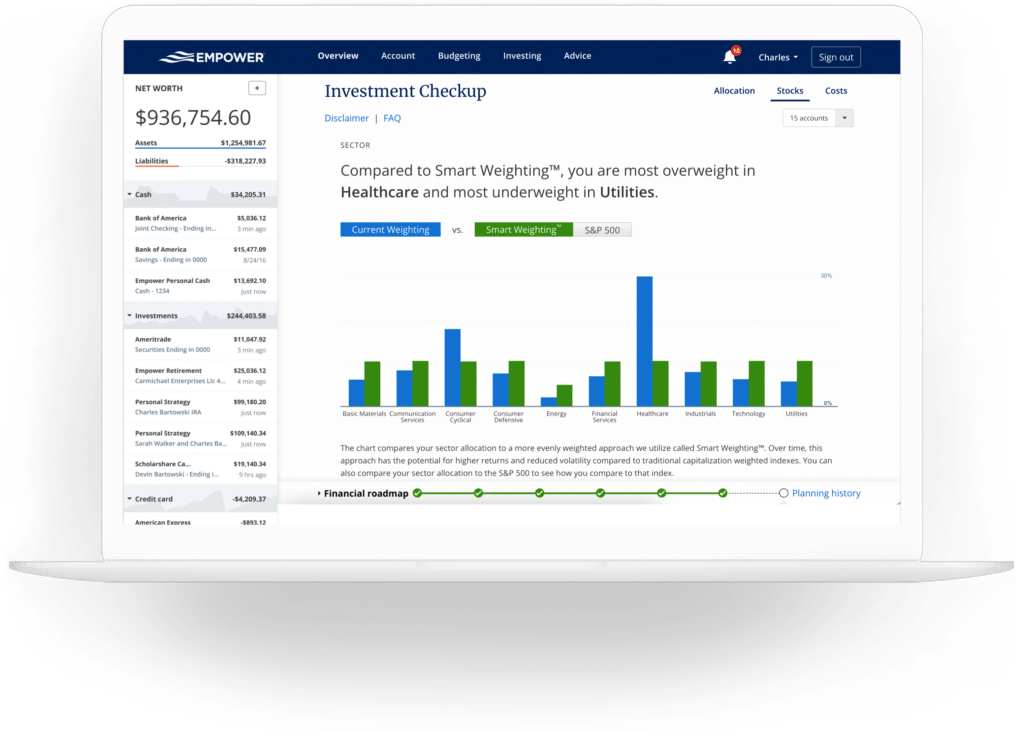
Second, in addition to performance data, it gives you data on the fees charged by each of your investments and how those fees will affect your wealth over time. Third, it provides an interactive graph of your asset allocation. Finally, It integrates all of your data into a robust retirement calculator you can use to plan your future retirement.
You can link bank accounts, credit cards, investment accounts and even the value of your home through Zillow. In this regard, Empower enables you to manage all of your finances, not just your investments.
Kubera
Kubera is the app I’ve been using for that past few years. It’s both the easiest tool to use and in many ways the most sophisticated.
Its visual presentation is clean and simple. You can organize your investments in sheets. For example, you could separate retirement, taxable, HSA and real estate. It provides a net worth summary with graphs. You can also track insurance policies, store important documents in its virtual “Safe Deposit Box,” and add “beneficiaries” who can receive all the information in your account should you die.
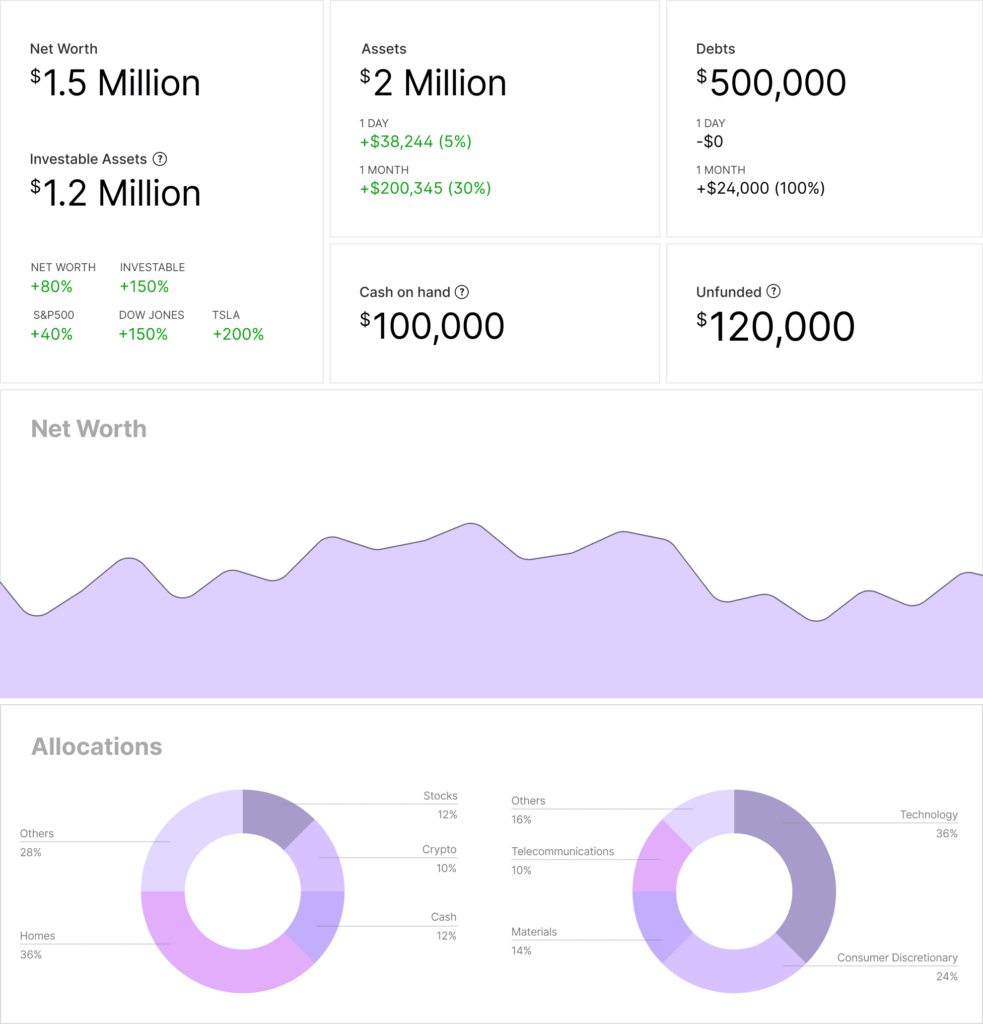
So what about its sophistication? First, unlike many apps that use just one way to connect accounts, Kubera uses several industry-standard aggregators to connect investment, banking and other financial accounts. The result is more accurate updates.
Second, Kubera has features to track a variety of assets. In addition to financial accounts, you can track vehicle values with just a VIN, any domain, and real estate. Unlike other apps that just pull in the value from Zillow, Kubera uses several tools to analyze a property’s value.
Third, Kubera offers a number of ways to track crypto. You can connect crypto exchanges and wallets, as well as coins.
Fourth, Kubera enables you to track investments in multiple currencies, including U.S. dollars, Euros, Pound Sterling, Australian dollars, Canadian dollars, Singapore dollars, and even crude oil and gold.
Finally, Kubera uses AI to scan a PDF, CSV file or even a screenshot to easily upload financial assets.
Kubera costs $249/year, and they offer a 14-day free trial.
Monarch Money
Monarch Money is best known as a budgeting app. It’s one of the best available today, and my wife and I use it to manage our finances. What some don’t realize is that it can track your investments, too.
Setting up investment tracking is simple. You connect your investment accounts to Monarch the same way you’d connect a bank account or credit card. Monarch recognizes it as an investment account and segregates into the Investment section of the app.
Here’s what it looks like:
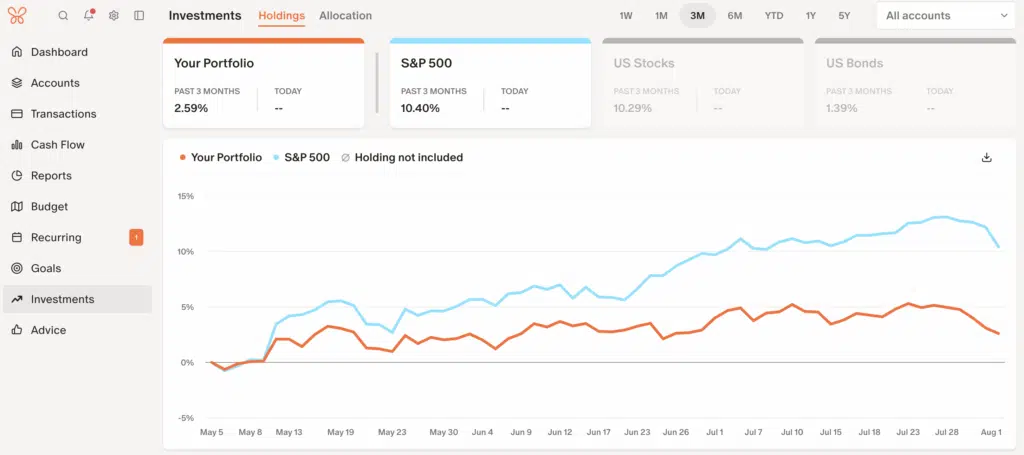
Monarch tracks your returns and individual investments. It also keeps track of how much cash you have in your investment accounts. The one downside is that its asset allocation features are limited.
Monarch money offers a 7-day free trial. After that it costs $99 a year.
Promo Code: Get 50% off the first year subscription with promo code ROB50.
Stock Rover
For those with more complicated stock portfolios, Stock Rover is an excellent option. This tool has a learning curve, but it provides video guides and plenty of help. Stock Rover provides a wealth of data on stocks, ETFs, and mutual funds and offers countless ways to evaluate individual investments or your portfolio as a whole.
For example, here’s just a fraction of the data available for Apple, a stock I own:
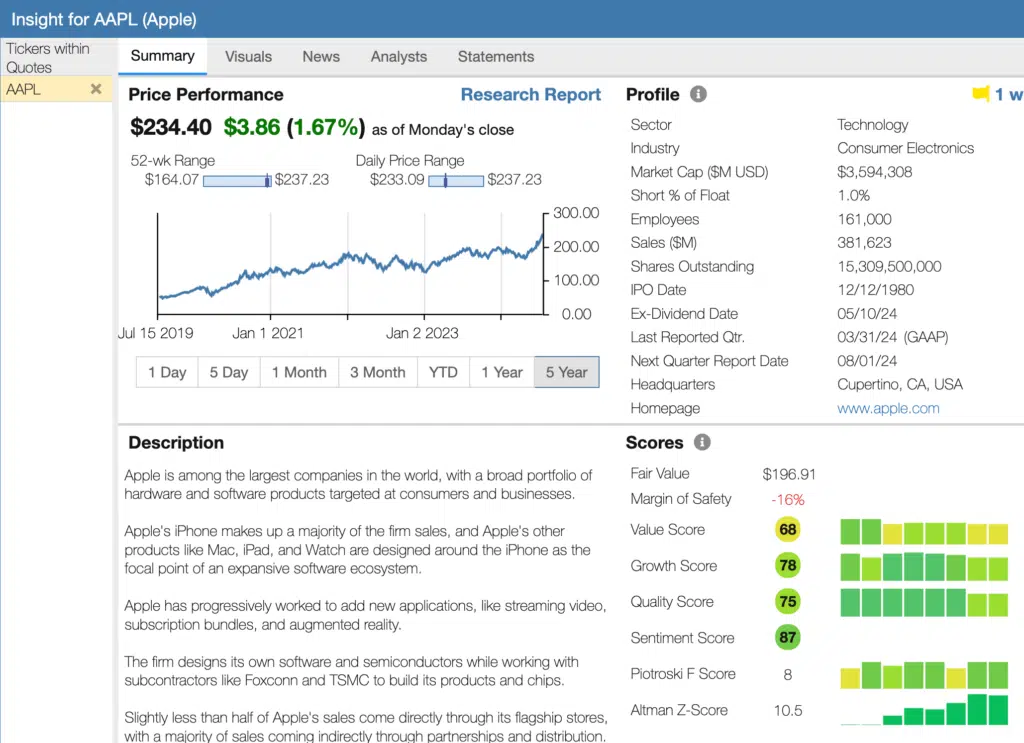
Beyond the above summary, you can get details on a company’s financials, news and analyst data.
The app enables you to connect all your investment accounts for automatic updates. Alternatively, you can enter your portfolio manually. It also offers pre-set portfolios you can use for evaluation purposes.
Frankly, the list of features is too long for one article, but include earnings calendar, alerts, stock ratings, future income estimates and model portfolios.
Stock Rover offers a free tier. Paid tiers range from $79.99/year to $279.99/year.
Snowball Analytics
I started using Snowball Analytics last year, and it’s quickly becoming one of my favorites. There are three reasons why.
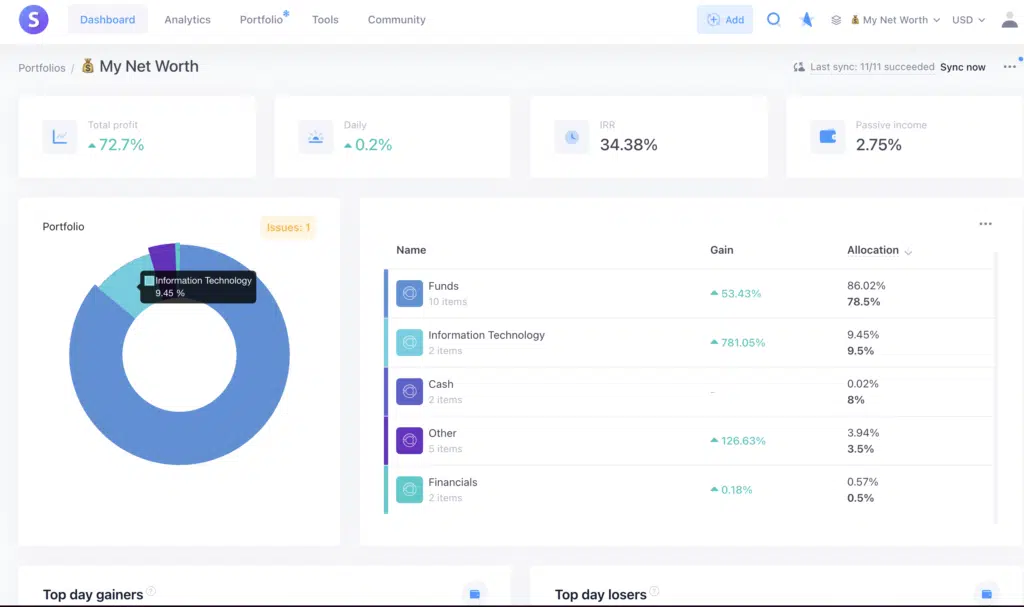
First, the layout is intuitive and easy to navigate. The dashboard shows, among other things, your overall asset allocation, performance, dividend yield, a projection of future dividends. Here’s a partial screenshot of my dashboard with my actual numbers hidden (one of many features):
Second, Snowball Analytics offers a lot of features. You can connect all your investment accounts or enter portfolios manually. It tracks all of the investments you own, showing you the investment’s performance, past income, projected future income (dividends and interest), future events such as dividend payouts and the latest news.
Third, the price is reasonable. It offers a free, limited plan, and paid plans range from $6 to $18.80 per month.
Simply Wall St.
Simply Wall St. offers an investment tracking tool aimed at those investing in stocks and ETFs. It doesn’t support mutual funds. If that limitation isn’t a deal breaker, this tool has a lot to offer.
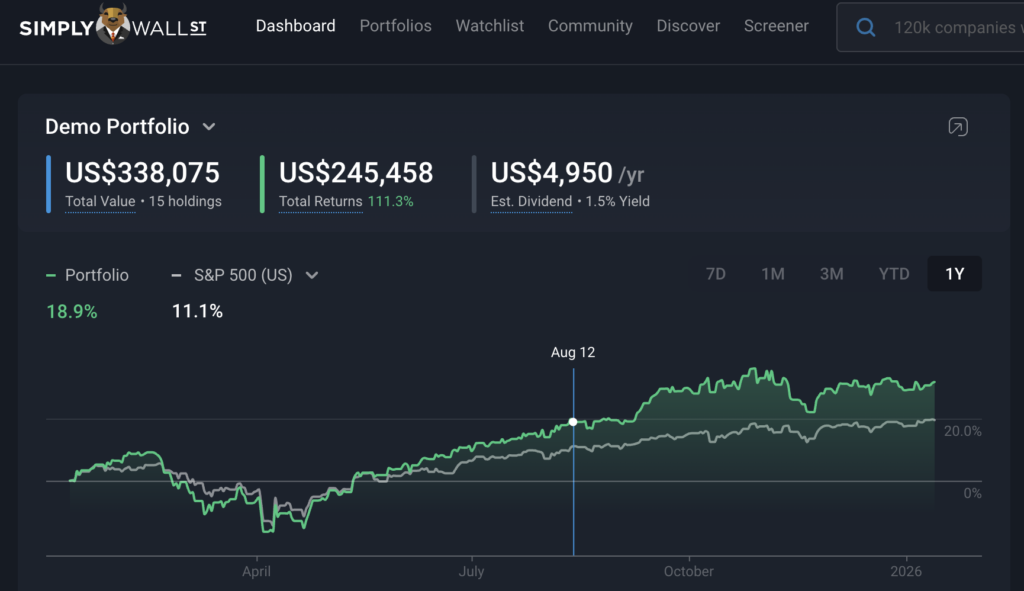
Users can link their investment accounts or enter them manually. They support more than 2,000 brokers worldwide. Once linked, Simply Wall St. offers several tools to track and evaluate your portfolio. The dashboard shows your portfolio balance, returns, and expected dividends over the next 12 months.
Morningstar
Morningstar is another tool that I’ve used for many years. In fact, I’ve created a YouTube video course that walks through how to use the robust tools offered by Morningstar. The tools include a portfolio tracker.
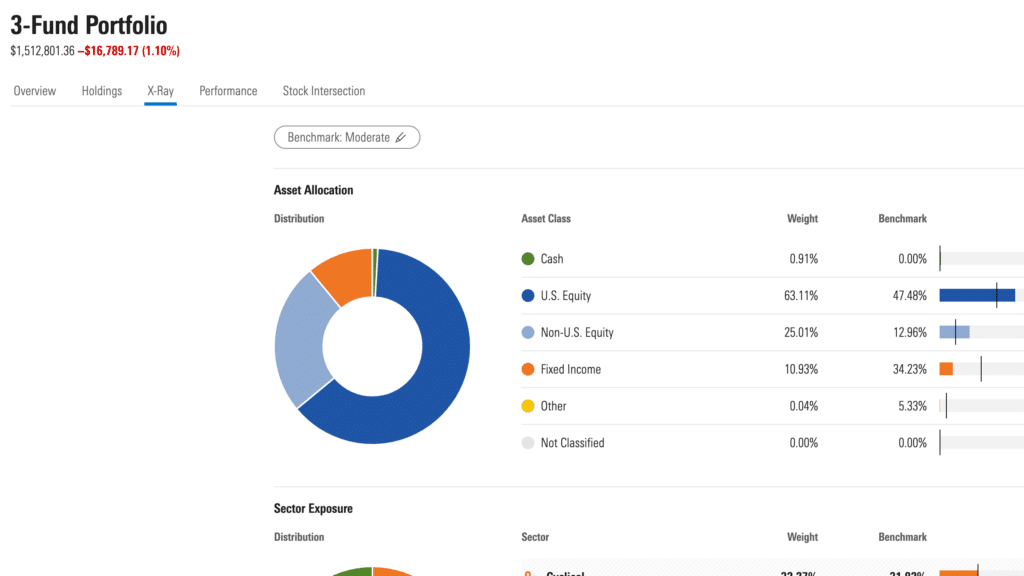
The one downside is that the tool only tracks performance for manually entered accounts. You can link your retirement and brokerage accounts, and you can analyze your investments using Morningstar’s industry-leading tools, but you won’t see performance data. It’s a major shortcoming.
Morningstar Investor costs $249 a year or $34.95 a month. They are offering $50 off your first year, bringing the price to $199. Morningstar also offers a 7-day free trial.
Quicken Premier
Quicken is arguably the longest surviving budgeting and personal finance software. I was using it more than 20 years ago. Today with Quicken Premier you can track your investments, including your performance and realized and unrealized gains. And it has tools to make preparing your taxes easier. It also pulls in data from Morningstar. On the downside, however, there’s an annual fee for the software of approximately $75.
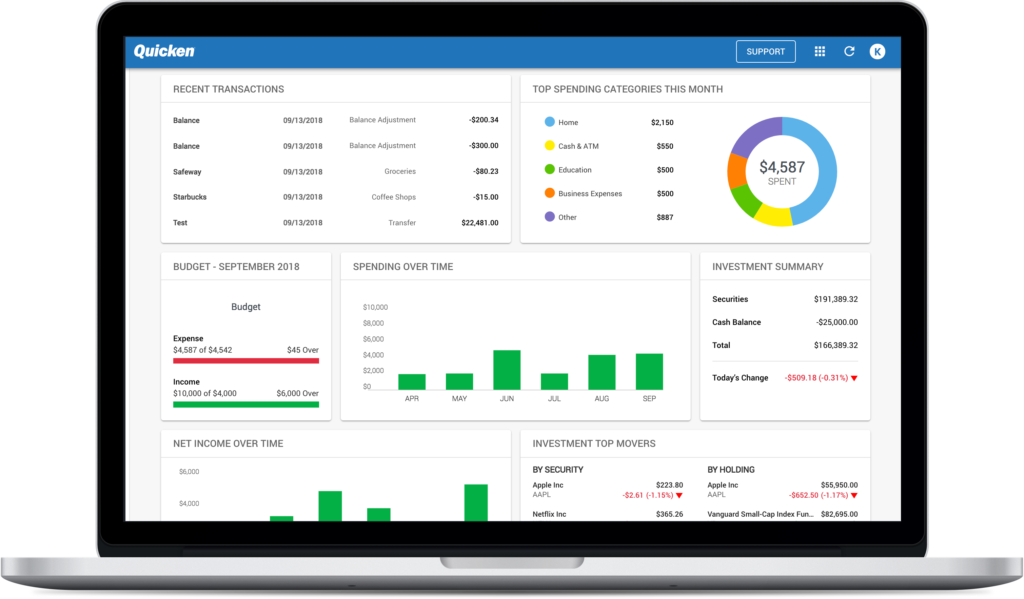
Quicken Premier costs $8.49/month billed annually, and is available for PC and Mac. Note that Quicken is software, not an online app.
How to Choose the Best Investment Tracking App
The best way to track your investments depends on the complexity of your portfolio. For those with just a single account, a portfolio tracking app isn’t necessary. If all of your investments are in a 401k at work, you can simply track and manage your investments through the brokerage that holds your 401k. Likewise, if you have a single IRA account, you can track that investment easily wherever it is being held.
If, like me, you have multiple investment accounts, a tracking app is the best way to manage your investments. That’s particularly true if you hold investments at different brokers. This is common when individuals open up IRAs at brokers and have 401k’s elsewhere. It’s also common with spouses who often have retirement accounts at different financial institutions.
For these types of portfolios, an investment tracker that automatically downloads transactions and balances is ideal. Here, you want to look for an investment app that offers tools to help you analyze your portfolio. The most important tools give you insight into your asset allocation, investment fees and retirement readiness.
We rate Empower as the absolute best investment tracking app, because it does all of this for free. For High Net Worth Individuals or those wanting to track a variety of asset types, including crypto, Kubera is an excellent option. The other apps in our list are also good options.
Methodology
The methodology used in selecting the best investment tracking apps was simple–I’ve used each and every one of them, along with dozens of other options not listed. In most cases, I’ve used the software for years.
I based the selection on several factors:
- Cost
- Automation
- Investment analysis tools
- Retirement planning tools
- Ease of use
- Dashboards, charts and reports
I’m also in the process of evaluating other stock tracking apps including Koyfin, Sharesight and Snowball Analytics. I’ll update this article soon.
FAQs
What is the best investment tracking app?
In my view, the single best investment tracking tool is Empower. It’s free, automated, and has a wealth of investment analysis tools.
Are investment tracking apps hard to use?
Some are and some are not. With tools like Empower or Quicken, It’s simply a matter of connecting your investment accounts. Once connected, the tools analyze all of the data and present it in a way that’s easy to understand.
Some software that must be downloaded, however, has a much higher learning curve. And for that reason did not make our list of the best options.
How do I set up investment tracking alerts with many of the tools on our list?
You can get notified when any transactions occur in your account. Empower, for example, will email you every day, week or month to notify you of any transactions in your linked accounts.
