



Retirement calculators can help us plan and prepare to retire. When we are years away, these online tools can help us determine how much we should be saving. As we approach our time to retire, they can help us understand how much we can spend each year in retirement without going broke.
Not all retirement tools, however, reach the same result. They take different approaches to what is a complex series of calculations and assumptions. One study examined five popular retirement planning software packages and found stark differences in outcomes. As a result, it recommended that individuals use “multiple programs before implementing an action plan based on the results.”
To that end, here is a list of the best retirement calculators. Note that I have used each of these tools for years, as well as many others that didn’t make the list. I also know the founders of most of these tools.
My Top Picks
Of all the retirement planners available today that I’ve used, four stand out among the rest:
Empower
Best free option, Empower is ideal for those who want an easy-to-use tool that also allows you to connect and track all your investment accounts.
I’ve used Empower for more than a decade, dating back to when it was called Personal Capital. It stands out for two reasons. First, it is free. Second, it offers an easy to use robust retirement planner that integrates all of your connected investment and retirement accounts.
Using a monte carlo simulation, it generates a chance of success. It also enables you to compare multiple plans with different assumptions. It’s not as comprehensive as my other favorite picks below, but it’s a solid option particularly if you have more than five years before retirement.

Pros: Connect accounts, monte carlo simulation, compare plans, easy to use
Cons: No Roth conv. modeling, Social Security claiming strategies, complex income or expense modeling
Platforms: Web, tablet or smartphone
Cost: Free
Note: Empower is best used by those who are comfortable connecting their investment accounts to the app. I recently interviewed an expert from Plaid on just how safe it is to connect our accounts to apps. Plaid is one of the industry-leading companies that apps like Empower use to aggregate a user’s financial accounts. You can check out the interview here.
ProjectionLab
I’ve used this tool since the founder Kyle Nolan first launched it. It offers some of the best charts, graphs and user interface of any retirement planner. Its tax analysis is excellent, as is a new feature to run “what-if” scenarios. It’s an excellent tool for retirement planning as well as overall financial planning.
ProjectionLab offers a free version and its Premium version is either $109 a year or $799 for a lifetime subscription.
10% Discount: I have a promo code for a 10% discount. At the request of ProjectionLab, the discount code is only available for those who subscribe to my newsletter, which you can do here. The newsletter is free, goes out every Sunday morning, and you can unsubscribe at any time. After you subscribe, you’ll receive an automated email with the ProjectionLab discount code.
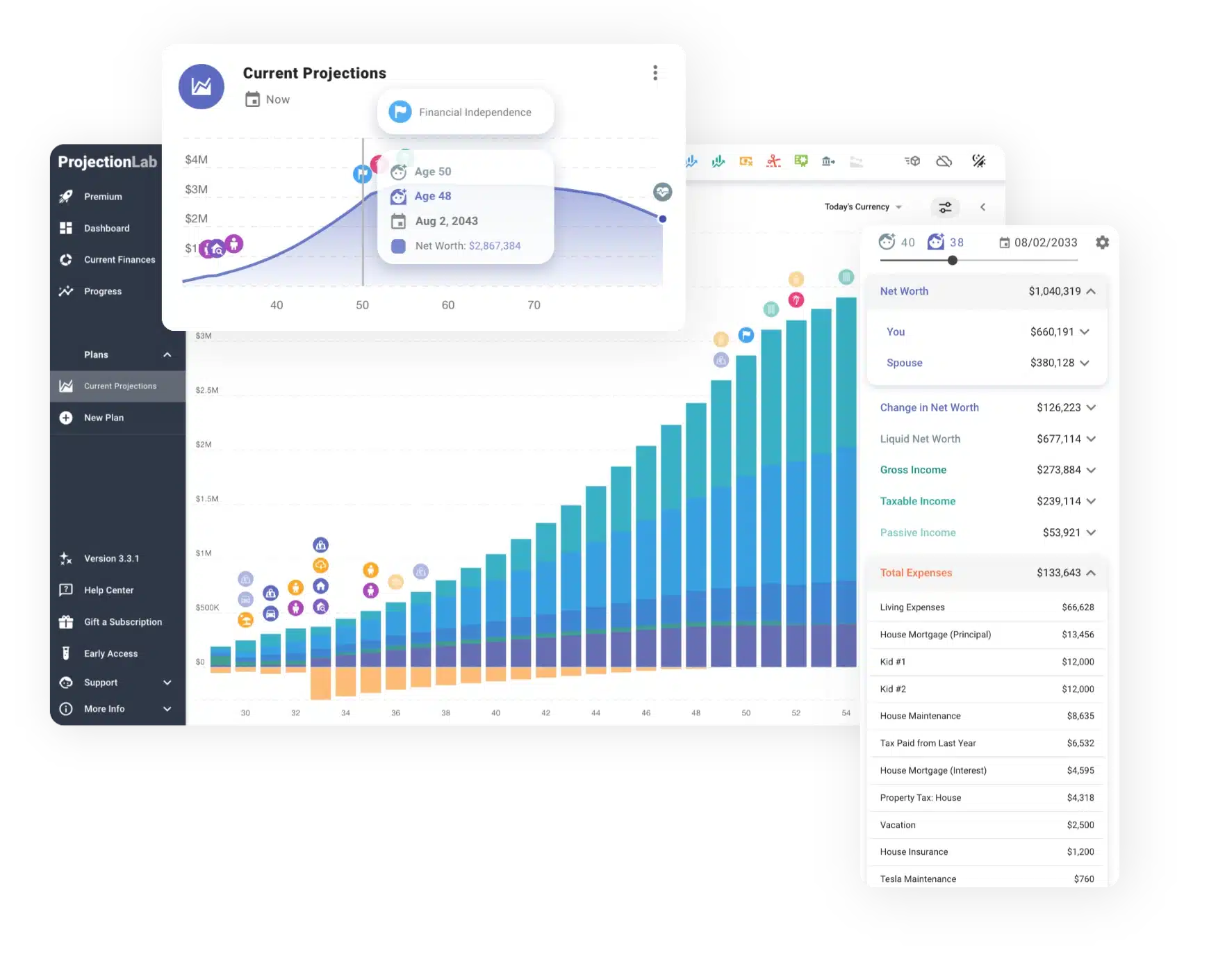
Pros: Easy to use, excellent charts, best in class what-if scenarios, monte carlo and historical simulations
Cons: No Roth conv. or Social Security simulation tools
Platform: Web
Cost: Free version, Premium is $129/year
Boldin
Boldin allows you to model virtually every aspect of retirement. It projects future income, expenses, and net worth. You can set income and expenses on a monthly, yearly, or one-off basis. It can model social security, pensions, and even Roth IRA conversions. There is an annual fee, although Boldin does offer a free trial.
Boldin offers a free version and its PlannerPlus version is $12/month billed annually after a 14-day free trial. While I like all of the tools on this page, Boldin is what I use to model our retirement plan.
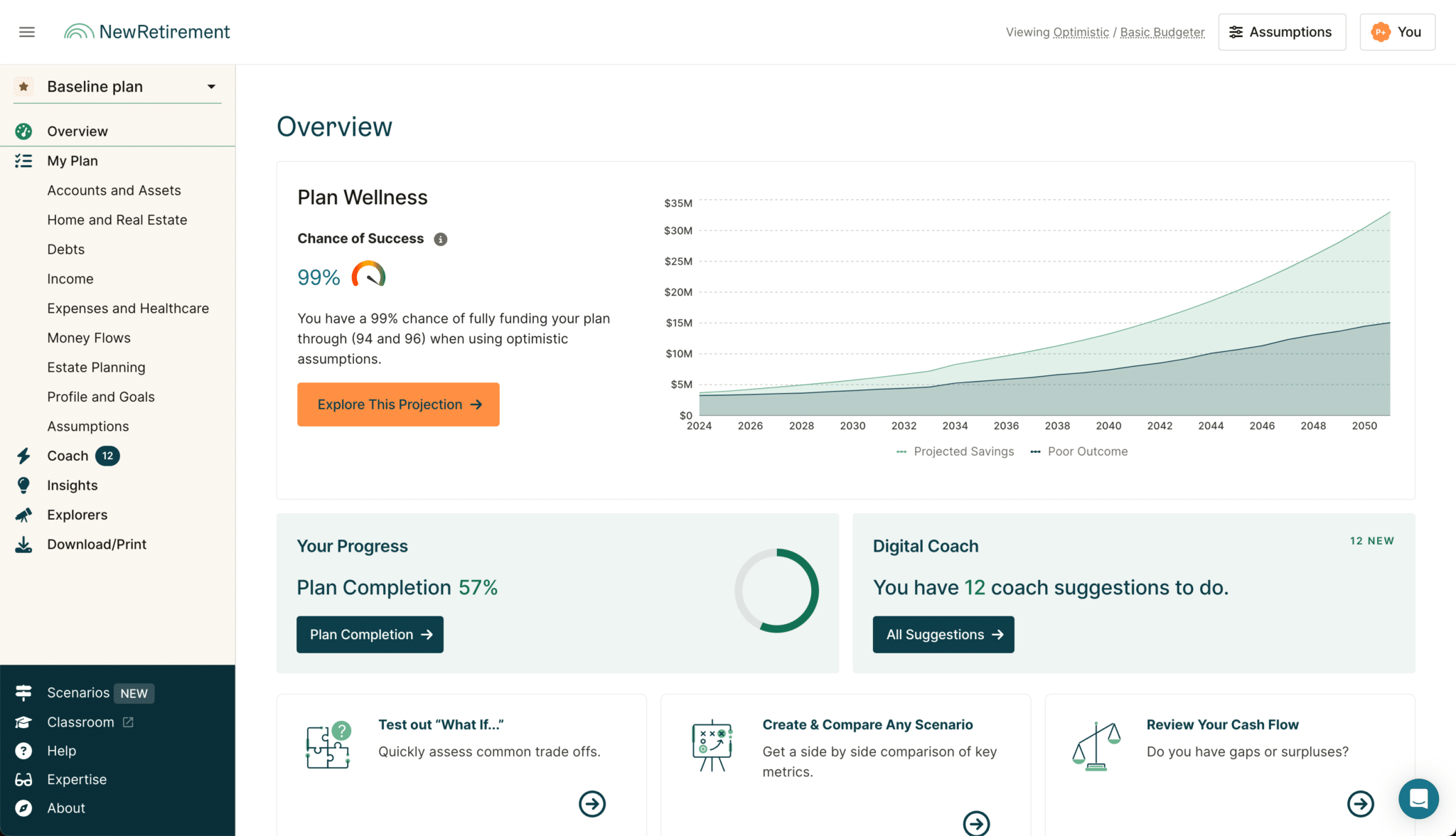
Pros: Combines ease of use with lots of features; data presented in user-friendly charts and tables
Cons: No simulation based on historical data
Platform: Web
Cost: Free version, PlannerPlus is $144/year
Pralana
Pralana is the most feature-rich retirement planner available today. I believe that’s true even among financial planners used by professionals. The high-fidelity of this planner, however, comes with complexity and a high learning curve. If you are up to the challenge, Pralana is for you.
As one example, you can model Roth conversions based on ACA credits, something other tools don’t offer. But be warned, it is a complex application. If you love number crunching and are willing to invest the time, Pralana is worth considering.
You can see some of Pralana in action in this video.
Best Retirement Planners
What follows are my top 6 picks. Note that the first two are also retirement planners, meaning they have far more robust features than a simple calculator. The final three options are retirement calculators only. The inputs are much more limited, but these tools give you a quick estimate of when you can retire.
1. Boldin (formerly New Retirement)
Boldin is not for the faint of heart. The tool, which has both a free and paid version, enables users to model just about every aspect of retirement. For example, users can model social security claiming strategies, medicare coverage, annuities and pensions.
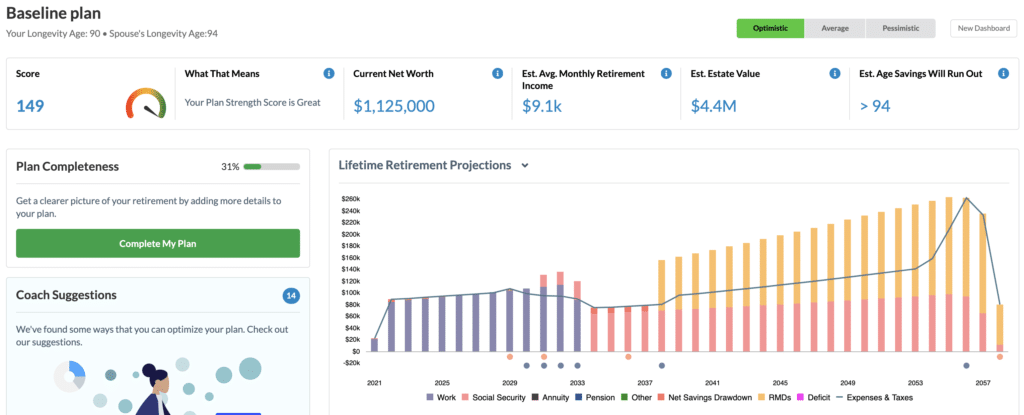
New Retirement handles the complexity of retirement planning in two ways. First, users can follow a quick start guide, answer a few simple questions, and have a complete snapshot of their retirement readiness in under five minutes.
Following that, users can dive into the details of everything from future healthcare costs to retirement savings contributions. New Retirement enables users to link investment and retirement accounts or enter them manually.
Boldin offers two plans, one free and one $12 a month billed annually.
I recorded a live working session on New Retirement that you can check out here:
Unique Feature: New Retirement includes a Roth IRA conversion calculator to help users determine when and how much of a traditional IRA should be converted to a Roth IRA.
2. Projection Lab
Projection Lab is another favorite of mine. I’ve met the developer, Kyle Nolan, and I can tell you he puts 100% of his energy into this tool. It’s easy (and fun) to use, and it produces excellent charts and graphs.
It works similar to New Retirement. You enter your income, expenses, and investments. It can handle a multitude of account types, including traditional and Roth 401k/403b accounts, Roth and traditional IRAs, HSA accounts, and, of course, taxable investment and savings accounts.
You also enter information about your retirement plans. This would include when you and your significant other if you have one plan to retire, when you plan to take Social Security, and your estimated life expectancy. You can also set other financial goals, such as when you’ll achieve financial freedom, getting out of debt, buying a home, and college education for your children.
Projection Lab then crunches the numbers in your base plan. Here’s an example of what the results look like:
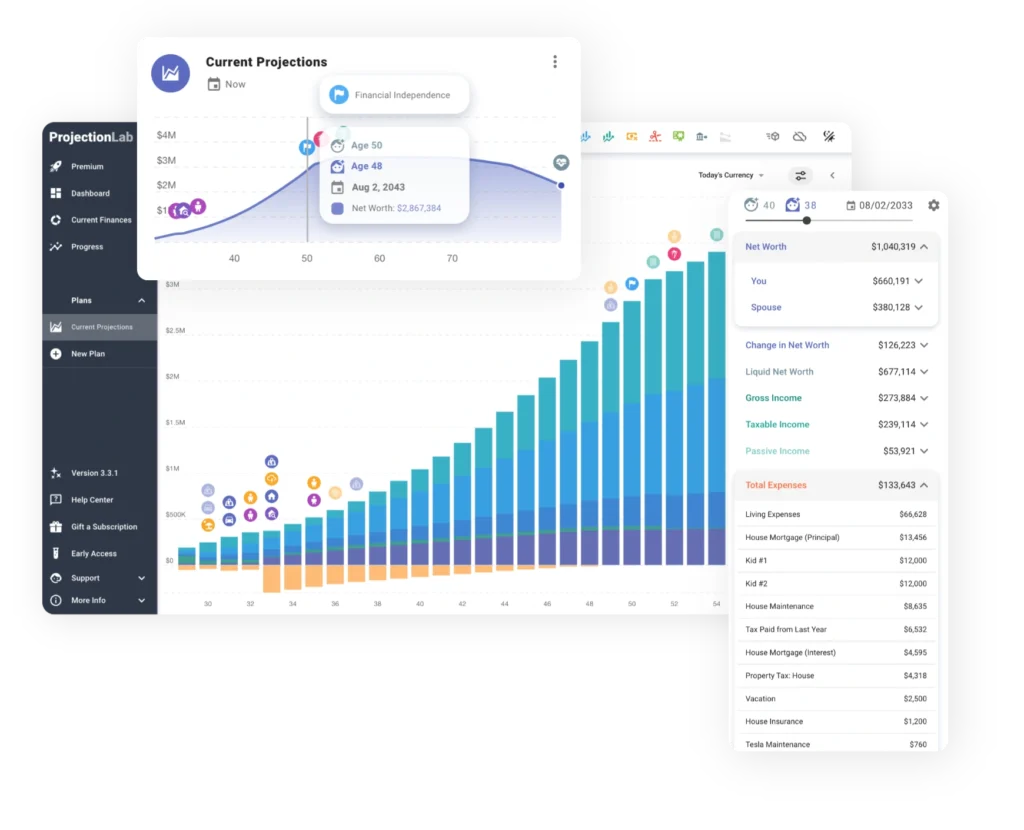
One feature unique to Projection Lab is the ability to model different retirement withdrawal strategies, such as the 4% Rule, Guyten-Klinger, and Variable Percentage Withdrawal.
Here’s my video review of Projection Lab:
I should note that Projection Lab has added some nice features since I recorded this video. Kyle is doing a great job with this planner.
You can get the Basic plan for free, or the Premium plan with more features for $129 per year, after a 7-day free trial.
3. Empower
Best free retirement calculator
Empower is my favorite investing and retirement tool. In addition to being totally free, it’s extremely easy to use and rich in features. Once a user connects their 401k, IRA, and other investment accounts, Empower pulls all the data from the accounts into its Retirement Planner.
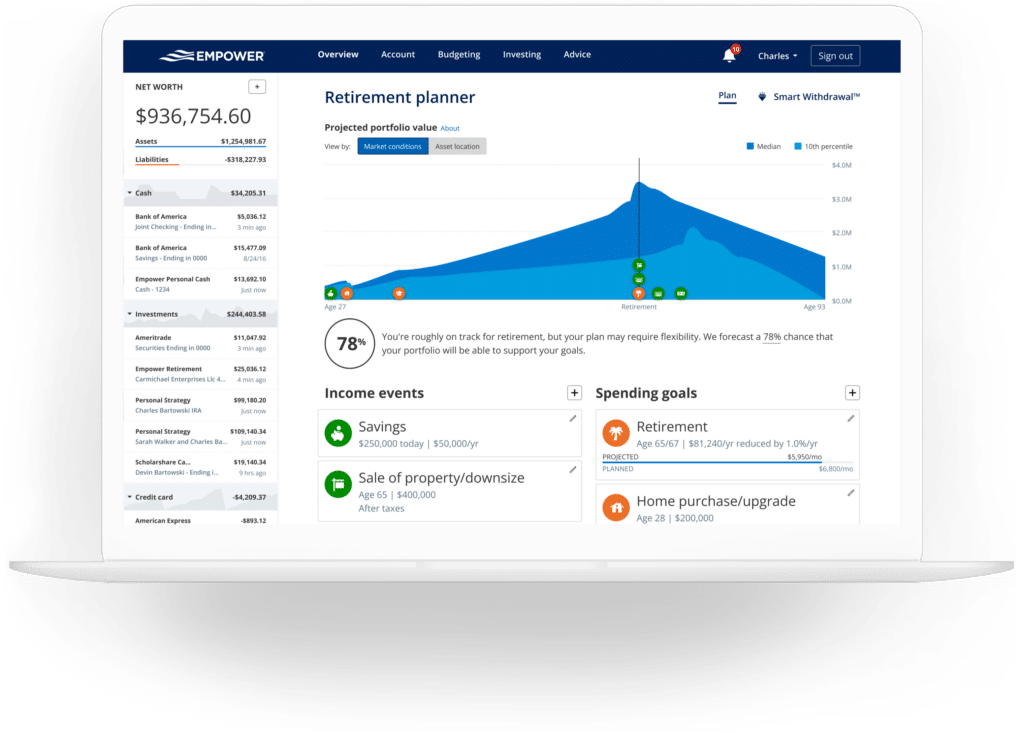
The Retirement Planner then allows users to model both income events (e.g., savings, sale of real estate, social security, pensions) and spending goals (e.g., retirement spending, travel, education). Users can also set up multiple scenarios to compare, such as retiring at different ages. Empower then runs the data through a Monte Carlo simulation and reports the likelihood of the plan’s success.
Here’s a video walk-thru I did of Empower (it was called Personal Capital when I recorded the video):
Unique Feature: Users can create multiple scenarios (e.g., different retirement dates, different social security strategies) and compare how successful each will be.
4. Pralana
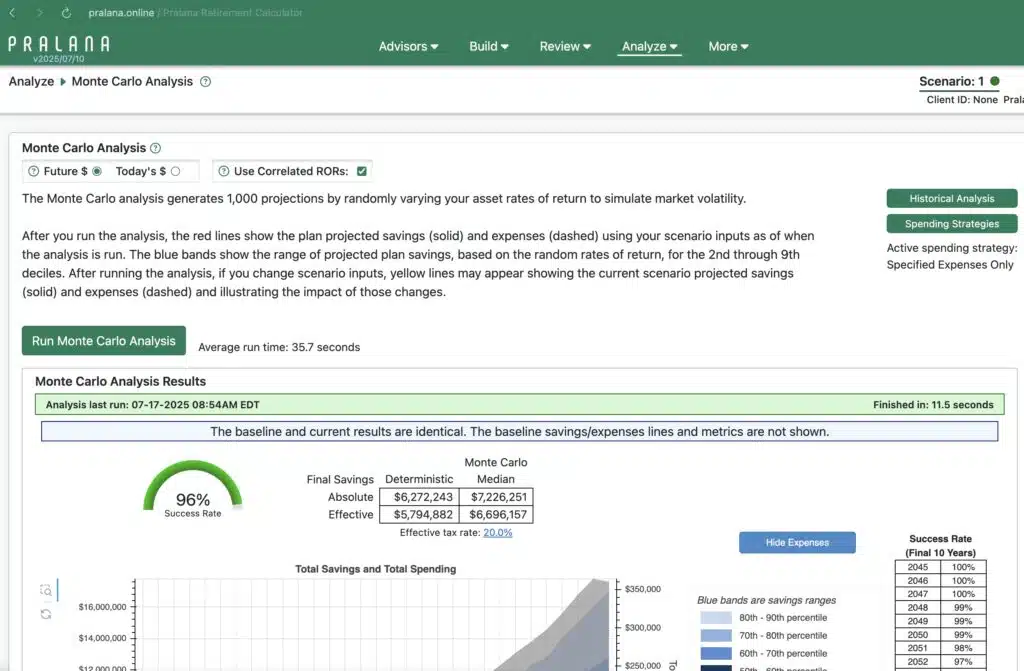
Pralana started out as an Excel spreadsheet. Recently the developer moved it to an online interface, while still making the spreadsheet available for those who prefer it. Simply put, it offers a more detailed analysis of a retirement plan than any other software I’ve used.
For example, its Social Security optimizer shows you visually how different claiming strategies compare. It can factor in ACA credits as part of a Roth conversion. It has excellent historical and Monte Carlo simulation features. But keep in mind that with all of these features comes more complexity. It took me longer to learn how to use the software compared to the other planners on the list.
5. Maxifi
Maxifi is a retirement planner based on the economic model of “consumption smoothing.” This model assumes that individuals want to spend the same amount of money each year after accounting for inflation. What does that mean in practical terms?
There are two ways to think about retirement planning. First, you could calculate your chance of success based on how much you want to spend each year. Second, you could calculate how much you can spend each year based on your assets and income sources. If that sorta sounds like the same thing, it is. But economists strongly believe that the second approach is better. I don’t; I like both approaches. But then again I majored in English.
Anyway, Maxifi was developed by an economists who has very strong views in favor of consumption smoothing. In my experience, retirees do not want to spend the same after-inflation dollars each year in retirement. Spending goes down as we age. But I think evaluating a retirement plan in this way is perfectly fine. In fact, the planning software above allows you to evaluate a plan both ways, which is just one reason I favor them.
That said, Maxifi does do a lot of sophisticated calculations behind the scenes. In fact, it can take 10 minutes or more to run various scenarios. I personally find it to be the hardest software on the list to use, but others really like it.
Retirement Calculators
NetWorthify
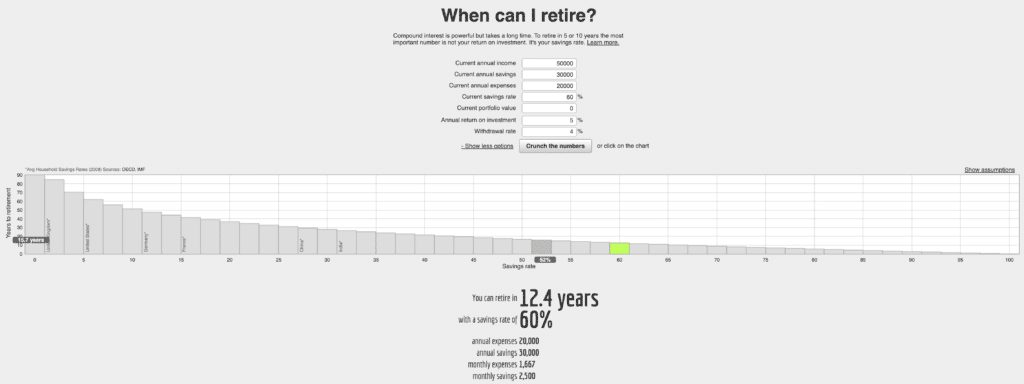
NetWorthify is designed for those wanting to retire early, although it works with traditional retirements, too. Simply enter your income, annual savings, and total savings, and NetWorthify estimates how long until you can retire. It’s free to use.
cFIREsim
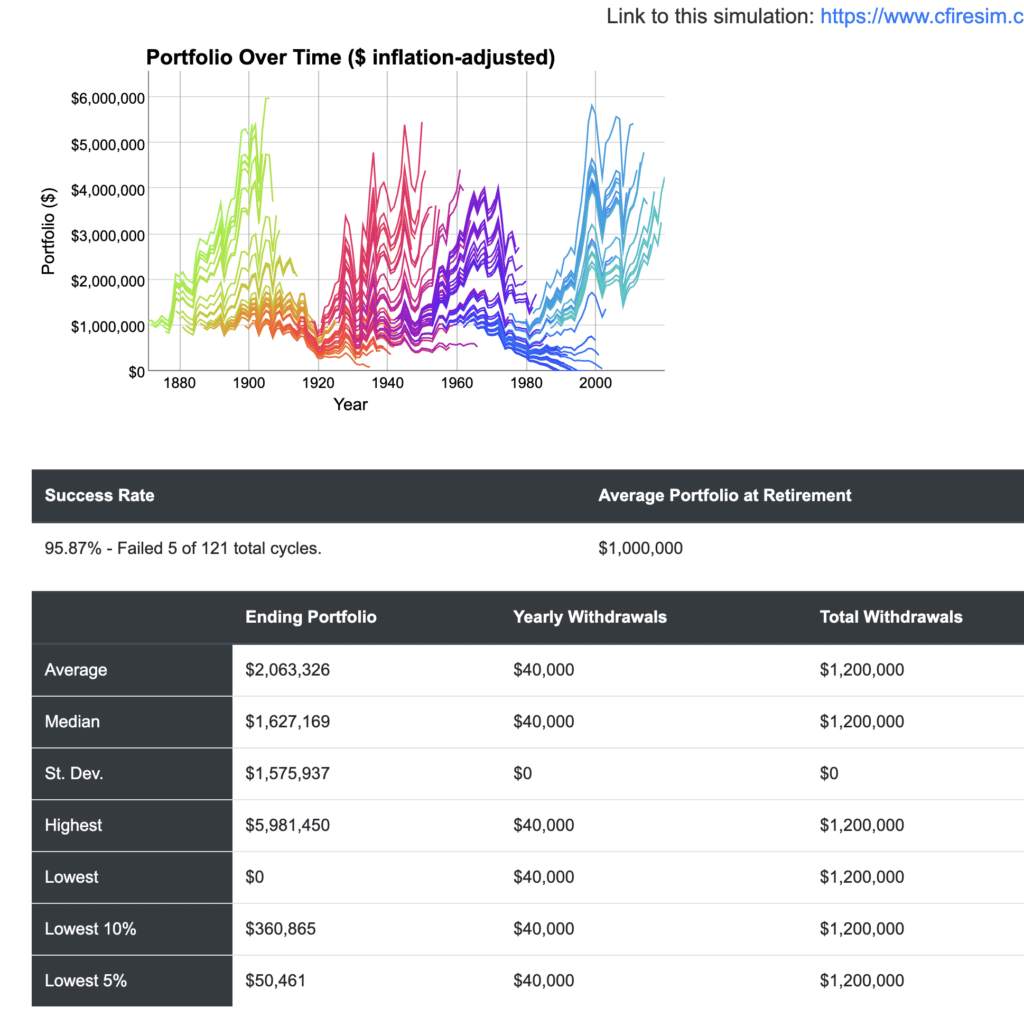
Another free option that I like a lot is cFIREsim. You enter some basic information such as when you plan to retire, current savings, income, asset allocation of your investments, and social security values. cFIREsim then calculates the likelihood of your success.
Fidelity’s Retirement Score Calculator
Fidelity’s Retirement Score Calculator estimates the percentage of your expenses in retirement that can be covered by your retirement savings. The calculator requires just a few pieces of information, including your age, salary, savings balance, and investment style. With this data, the calculator generates a retirement score:

Note that the calculator factors in an estimate of social security benefits.
Other Retirement Calculators Worth Considering
The following retirement tools didn’t make our list but still may be worth checking out. In some cases, I’m continuing to evaluate them, and some make the “best of” list in the future.
Retirement Calculators Not Worth Considering
Here are retirement tools that I believe aren’t worth our time. I list them here to keep a record of what I’ve looked at and so that readers know I’ve considered and rejected these options.
- Flexible Retirement Planner–Too many ads on the site and the planner must either be downloaded (Windows only) or used with Java Web Start.
FAQs
Are Retirement Calculators Free?
Most retirement calculators, unlike retirement planning software, are free.
What’s the difference between a retirement calculator and retirement planning software?
Retirement planning software is more robust than a retirement calculator. They can factor in far more details, such as different social security claiming strategies, Roth conversions, and Medicare premiums. They can also run ‘what-if’ scenarios. In contrast, a retirement calculator uses just a few inputs to give one a high-level view of their retirement readiness.
What is the best retirement calculator?
While the best retirement calculator will vary based on one’s personal preferences and specific goals, I believe Empower’s Retirement Planner is the best. It’s free and offers a good combination of features and ease of use.
